
Create a Google Hangout on Air Event for your Virtual Classroom!

So today my school closed due to the MERS illness that is going on around Asia.  I am not very concerned, but it is good to have precautions.  Students are working from home today.  This cropped up on us last minute, and I thought I'd share as to how to create a Google Hangout on Air for your Class.
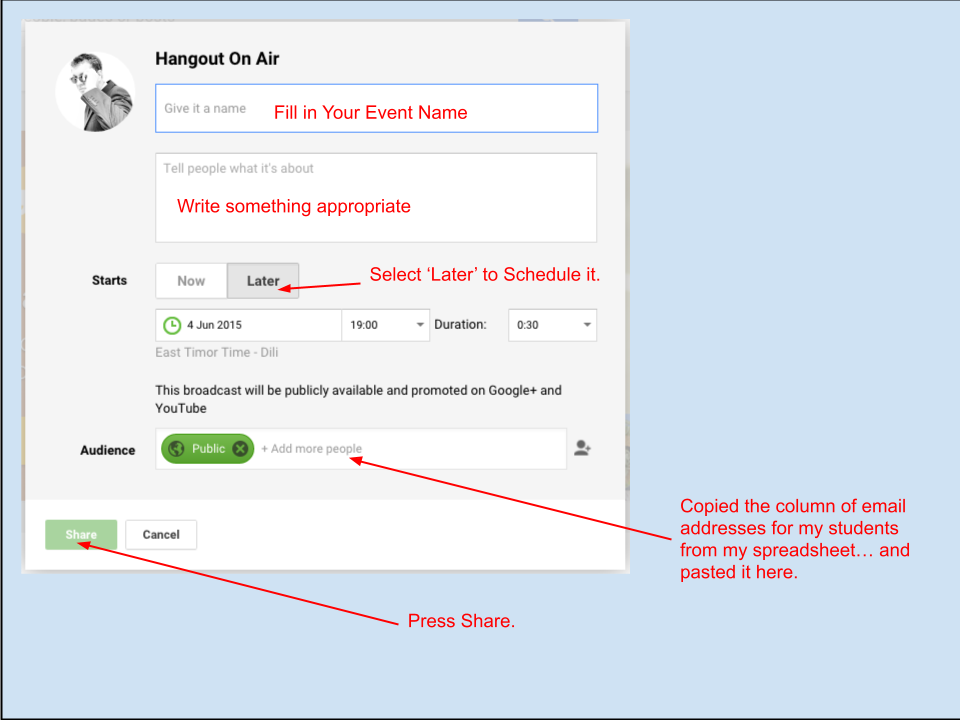
Prerequisites:

  • You need a YouTube Account that is Verified.  Visit https://www.youtube.com/features to do so.
  • This needs to be done with a Computer, not a tablet or phone.
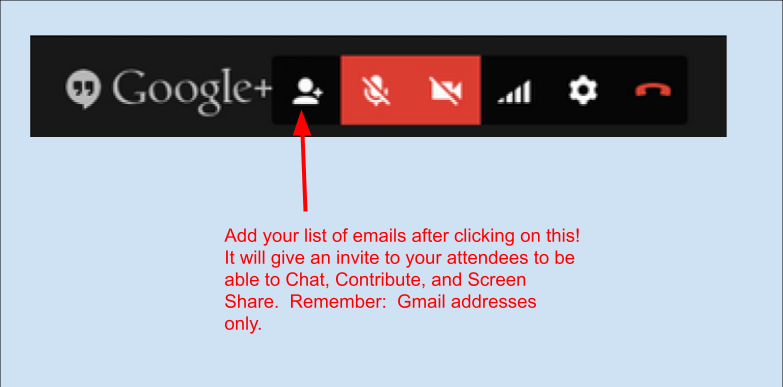
  • All "attendees" must have a Gmail account. (Google+ is not needed)
  • A list of your student "attendees" emails, I made mine in a Google Sheet.
  • Set up your Hangout on Air.  Visit https://plus.google.com/hangouts/onair


When you are about to Start your event:

  • Start your Broadcast 


  • Remind students to Mute their Microphone when not speaking.
  • The Hangout automatically puts the Speaker's picture in the main window.
  • Share your Screen from the Green Button Below.


After the broadcast, it will save to the YouTube account.
Here is my first full broadcast.  (Really not great, learning experience)


But I trimmed it down in YouTube editor.


This was our first attempt at doing this, and if I had time to prepare students, this may have gone more smoothly.  The goal here was to allow some interaction between teachers and students, while we were unable to meet.


Popular posts from this blog

Spike Prime Printable Blocks

As I prepare for coaching Middle Schoolers here in Waupaca for FIRST Lego League, I am trying to teach kids to code the SPIKE Prime Lego robots. This has its challenges. Some kids take to coding well, and some need more visuals to guide them. Teams may also want to whiteboard out their coding concepts.  I created this set of printable Word Blocks as a resource for printing, laminating, and maybe adding some magnets to the back. This allows me to put up code in a demonstration, or my teams to talk about how to achieve things after they have done some pseudo-coding of their projects. Having manipulative items are always nice for hands-on coding practice.  Whiteboard Word blocks for Proportional Line follow. Here is my collection of laminated word blocks Below are the files I created for creating these blocks. Feel free to use, but maybe send me a note & follow on twitter. @artschultz13 Direct link to folder shown below.

Graphic Organizers and Canva

Getting students to keep on task, keeping organized is a hard part of teaching in a middle school. I coach a Robotics team, and I also work with teachers to try to build their capacity for technology skills.  One way I try to help my kids is to teach teachers to create Graphic Organizers. Canva is a free tool that is great for creating all sorts of publications, videos, and even documents and websites. The tool is very flexible and allows you to upload graphics, or borrow from theirs. It has many great features for teachers, including classroom tools for creating alongside of your students. There are great tutorials for teachers, at: https://www.canva.com/designschool/tutorials/canva-for-teachers/ If you are not already using Canva, teachers can sign up for an upgrade through their verification process, and get it for free. Go to Canva.com/education Graphic Organizers Graphic organizers are a way to break down complicated problems into more manageable pieces. The often use colors ...

Changes...

 I have made a change in career path. I still work at the same middle school. But, I am back in the art room. The last year has been hard, working on new lesson units for 4 grade levels, as well as establishing classroom routines. As I write this, I am in my last week of teaching summer school. I have resolved to try to get back into the swing of things with blog posts, and try to post a bit more to socials. I have been back making art. Today, I was making a cardboard cosplay, this Iron Man inspired wearable. I am going to change the purpose a bit, but show some things I am doing in the art room too. The big thing is to try to share a bit more and be mindful of the little successes and share them out!